ZJU VPN - Windows 10
Create L2TP Connection
Windows Settings (press “Win + I”) -> Network & Internet -> VPN -> Add a VPN connection
- VPN provider:
Windows (built-in) - Connection name: any string like
zjuvpn - Server name or address:
lns.zju.edu.cn - User name: your_id
- Password: your_vpn_password
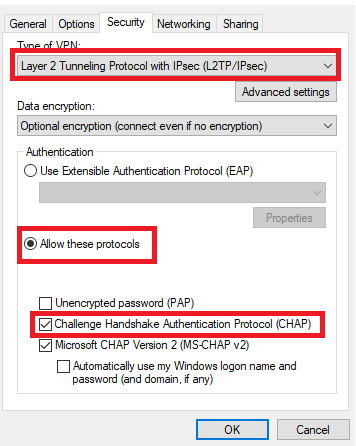
Edit L2TP Settings
Click Change adapter options below.
Find the connection just created.
Edit its properties.
Add static route
Run cmd as administrator,
route add -p 10.0.0.0 mask 255.0.0.0 10.x.x.1
where 10.x.x.1 is the gateway address.
You can find it with the command ipconfig.
Connect
Click the network icon in tray. You will find the VPN connection. Click “connect” and then Internet should be available.